[01] ARCHITECTURE & WORKFLOW

Application Features & Tooling

DevOps Tools Installer is engineered from the ground up for Windows 11. Every feature addresses real operational friction experienced by platform engineers, SREs, and cloud architects.

PROVISIONING COMPOSER

12 Curated Stacks & Custom Stack Builder

Provision a machine for specific engineering disciplines with 12 battle-tested bundles: Kubernetes Starter, Kubernetes Advanced, Cloud Engineer, DevSecOps, IaC Complete, Observability, and Terminal Power User.

Switch into the Custom Stack Builder for an interactive 2-column composer: browse 90 cataloged tools on the left with accessible "+ Add" buttons, reorder and inspect live download estimates on the right, save local presets, and export portable JSON definitions to share with teammates.

12 PRESETS DRAG & DROP SIZE ESTIMATES JSON IMPORT/EXPORT
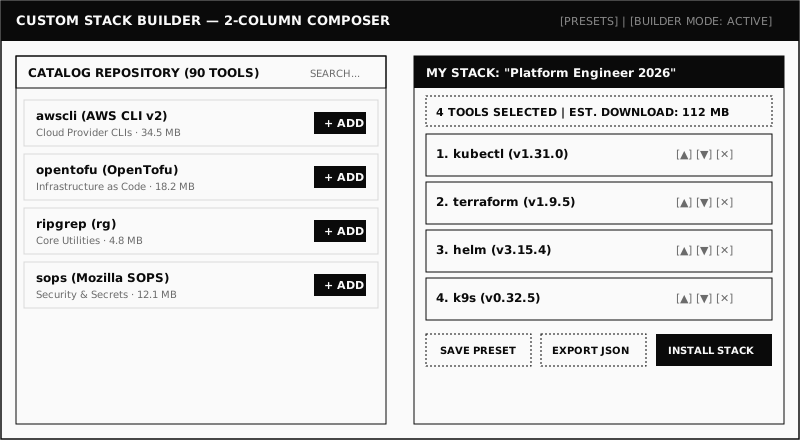
Custom Stack Builder Two-Column Composer interface screenshot placeholder
ENVIRONMENT HEALTH

Workstation Doctor & 5-Point Diagnostics

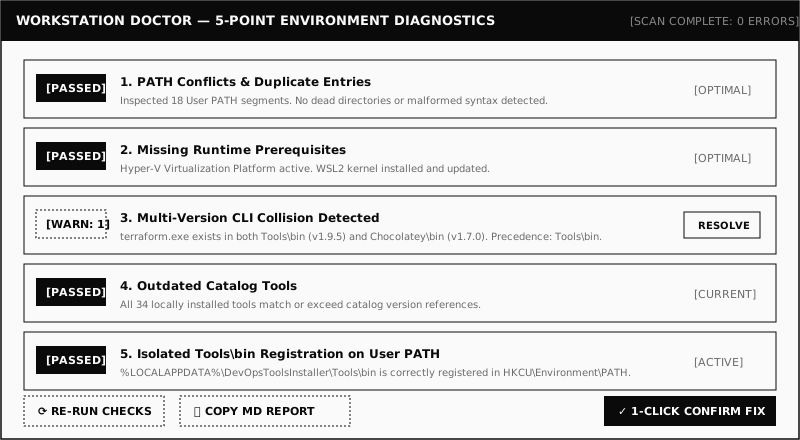
Catch silent configuration drift, broken paths, and binary collisions before they break scripts or CI builds. The Doctor asynchronously inspects:

  • PATH Conflicts & Duplicates: Redundant segments, malformed syntax, non-existent directories.
  • Missing Prerequisites: Hyper-V virtualization, WSL2 kernel readiness.
  • Multi-Version CLI Collisions: Detects competing binaries (e.g., terraform in both Tools\bin and Chocolatey\bin).
  • Outdated Catalog Tools: Compares active CLI versions against the cryptographically signed catalog.
  • Unregistered Tools\bin: Verifies standalone CLI binaries are registered on User PATH without admin rights.

Every "Fix" requires explicit user confirmation before applying, and exports markdown reports for IT tickets.

5 SCAN CHECKS SAFE BACKUP CONFIRMED REMEDIATION MARKDOWN EXPORT
Workstation Doctor 5-Point Environment Diagnostics interface screenshot placeholder
OBSERVABILITY & AUDIT

Universal Live Log Drawer (Ctrl+`)

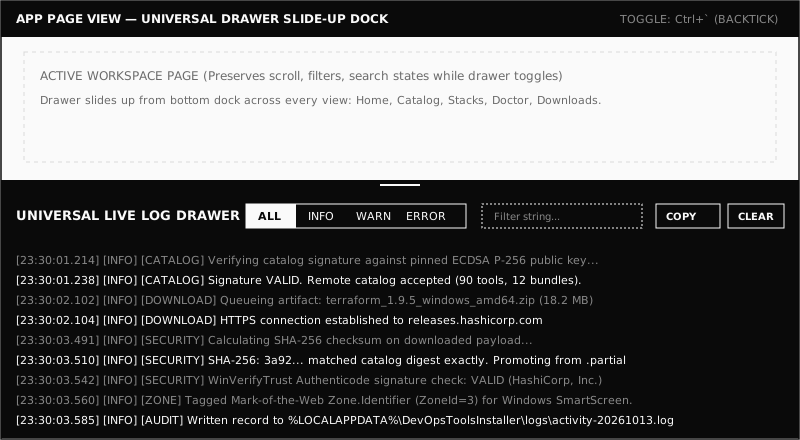
A persistent diagnostic slide-up drawer accessible across every page in the application via button or the universal Ctrl+` shortcut.

Streams real-time download events, HTTP Range byte resumption, SHA-256 integrity evaluations, Authenticode WinVerifyTrust verdicts, and install actions. Features high-performance virtualization (no frame drops across 10,000+ lines), severity filters (All, Info, Warning, Error), text search, and 1-click clipboard export.

Ctrl+` SHORTCUT VIRTUALIZED LIST REAL-TIME STREAM SEARCH & FILTER
Global Live Log Drawer interface screenshot placeholder with real-time events
NETWORK RESILIENCE

Resumable Transfers & Context-Aware Actions

Large vendor packages (Docker Desktop ~550 MB) shouldn't restart from zero because Wi-Fi dropped. Every transfer writes to a companion .partial file and resumes automatically via HTTP Range requests.

Files are promoted to target filenames only after SHA-256 checks pass. The app then triggers context-aware deployment:

  • Installers (.msi, .exe): Launches official vendor wizard with native UAC elevation.
  • Archives (.zip): Cleanly extracts into sandboxed user folders and symlinks/copies to Tools\bin.
  • Binaries (.exe): Places standalone CLIs directly into user Tools\bin.
  • Scripts (.ps1): Opens folder for manual inspection — scripts are never auto-executed.
HTTP RANGE RESUME .PARTIAL FILES CONTEXT DEPLOYMENT ZERO SILENT RUNS

FILE LOCATION CONTRACT

Storage Paths (%LOCALAPPDATA%)
%LOCALAPPDATA%\DevOpsToolsInstaller\ ├── Downloads\ (Active and verified vendor artifacts) ├── Tools\<tool-id>\ (Sandboxed extracted tool folders) ├── Tools\bin\ (Portable CLIs added to User PATH) └── logs\ (Daily timestamped activity audit files)

Never touches machine-wide directories (Program Files, System32) or machine environment variables (HKLM) without explicit vendor installer elevation.

WORKSTATION POWER TOOLS

CLI Health Probing & Shell Completions

The Installed view isn't just an inventory list. It actively probes each installed CLI binary (using --version or -v) and measures process latency in milliseconds to verify execution health.

Includes a built-in Shell Autocompletion Generator for PowerShell and Bash. Generate completion scripts for kubectl, helm, gh, docker, and terraform, and append them directly to your $PROFILE with a single click.

LATENCY PROBING (MS) POWERSHELL COMPLETIONS BASH COMPLETIONS REGISTRY UNINSTALL

AUTOMATED PROFILE INJECTION

DevOps Tools Installer appends shell autocompletions cleanly to your current profile with safety markers:

PowerShell Profile ($PROFILE)
# >>> DevOpsToolsInstaller Autocompletions >>> kubectl completion powershell | Out-String | Invoke-Expression helm completion powershell | Out-String | Invoke-Expression # <<< DevOpsToolsInstaller Autocompletions <<<
[02] NEXT STEPS

Inspect our cryptographic security model

Learn how the signed catalog, WinVerifyTrust, and Mark-of-the-Web protect your machine.